
BlueGPS / Deployment · Updated September 3, 2026 · Published September 10, 2026
BlueGPS On-Premise Deployment Architecture with IPS
Software components, execution model, and infrastructure requirements for deploying BlueGPS on-premise.
Last document update: September 3, 2026
1. Summary
This document describes the setup of the BlueGPS application on an on-premise environment. It covers the software components that make up the application, their execution model, and the infrastructure requirements for each server in the deployment.
2. Software components
The BlueGPS application on an on-premise environment is composed of several software components that are grouped into logical layers: the application layer, the IPS positioning layer, the database layer and the observability layer. Most components run as Docker containers managed through Docker Compose. The only exception is the IPS service, which runs as a web application deployed on a system Tomcat service.
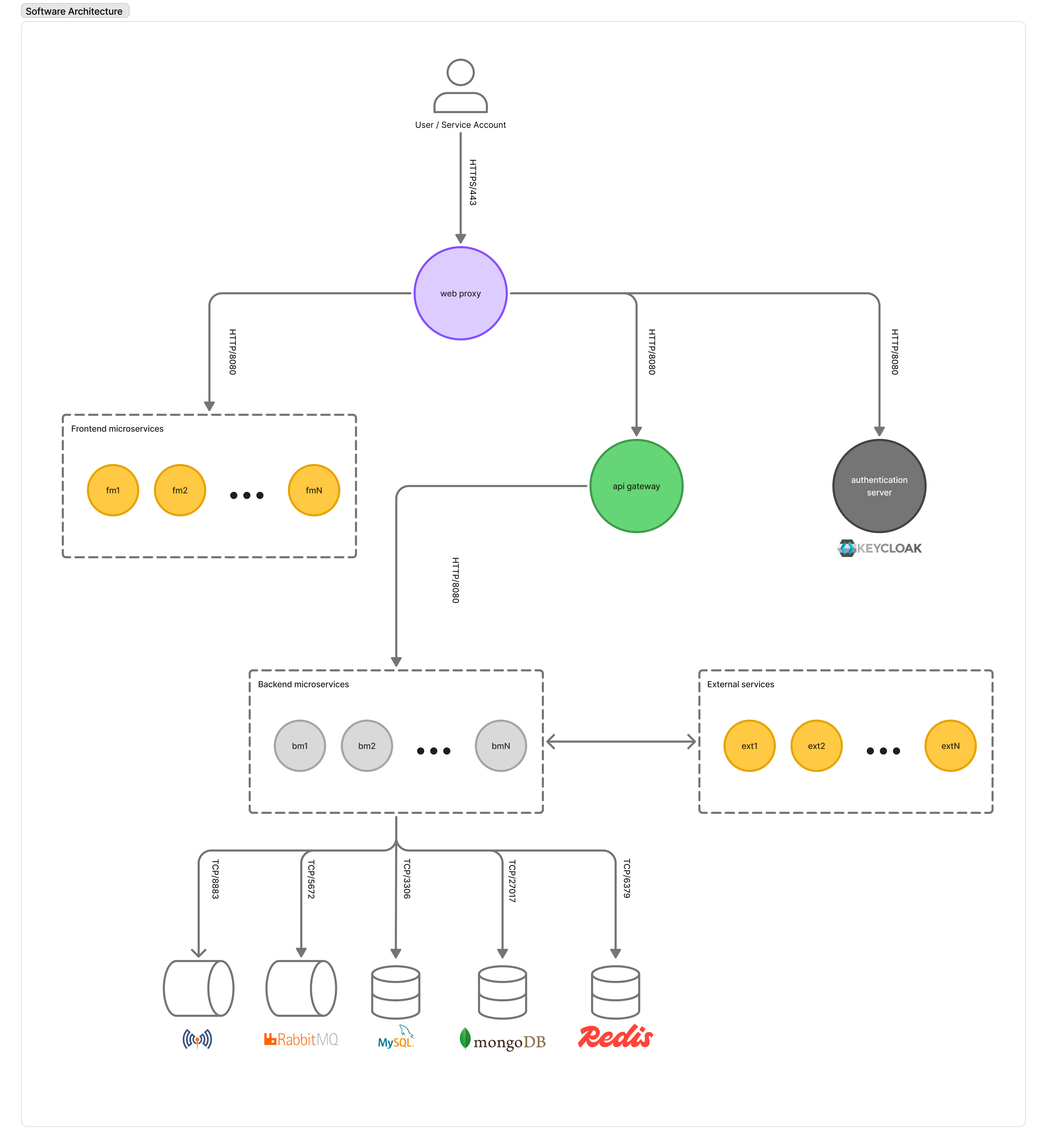
The following figure shows the software architecture of the BlueGPS application and the communication channels between its components.
2.1 Application containers
The application layer is made up of the following Docker containers, all executed on the application server:
- Web proxy: an nginx web server that listens for HTTPS requests on port 443. It is the single entry point for all inbound traffic and acts as a TLS termination point. It routes requests to the frontend microservices, the API gateway and the authentication server based on the URL path.
- API gateway: a Spring Boot application that acts as a reverse proxy routing external API requests to the appropriate backend microservice. It listens for HTTP requests on port 8080.
- Frontend microservices: one or more nginx containers that serve the BlueGPS frontend applications (developed in Flutter and Angular). Each container listens for HTTP requests on port 8080.
- Backend microservices: a set of Spring Boot applications that implement the domain logic of the BlueGPS application. They communicate with each other either synchronously via HTTP or asynchronously through the RabbitMQ message broker. They connect to the database services (MySQL on TCP/3306, MongoDB on TCP/27017, Redis on TCP/6379).
- Authentication server: a Keycloak container that manages authentication and authorization for the application. It is based on the OIDC and OAuth 2.0 protocols and listens for HTTP requests on port 8080.
- Message broker: a RabbitMQ container used for asynchronous communication between backend microservices. It listens on TCP/5672.
- Mosquitto broker: an MQTT container used for communication between the application and the IPS service. It listens on port TCP/8883.
2.2 IPS service
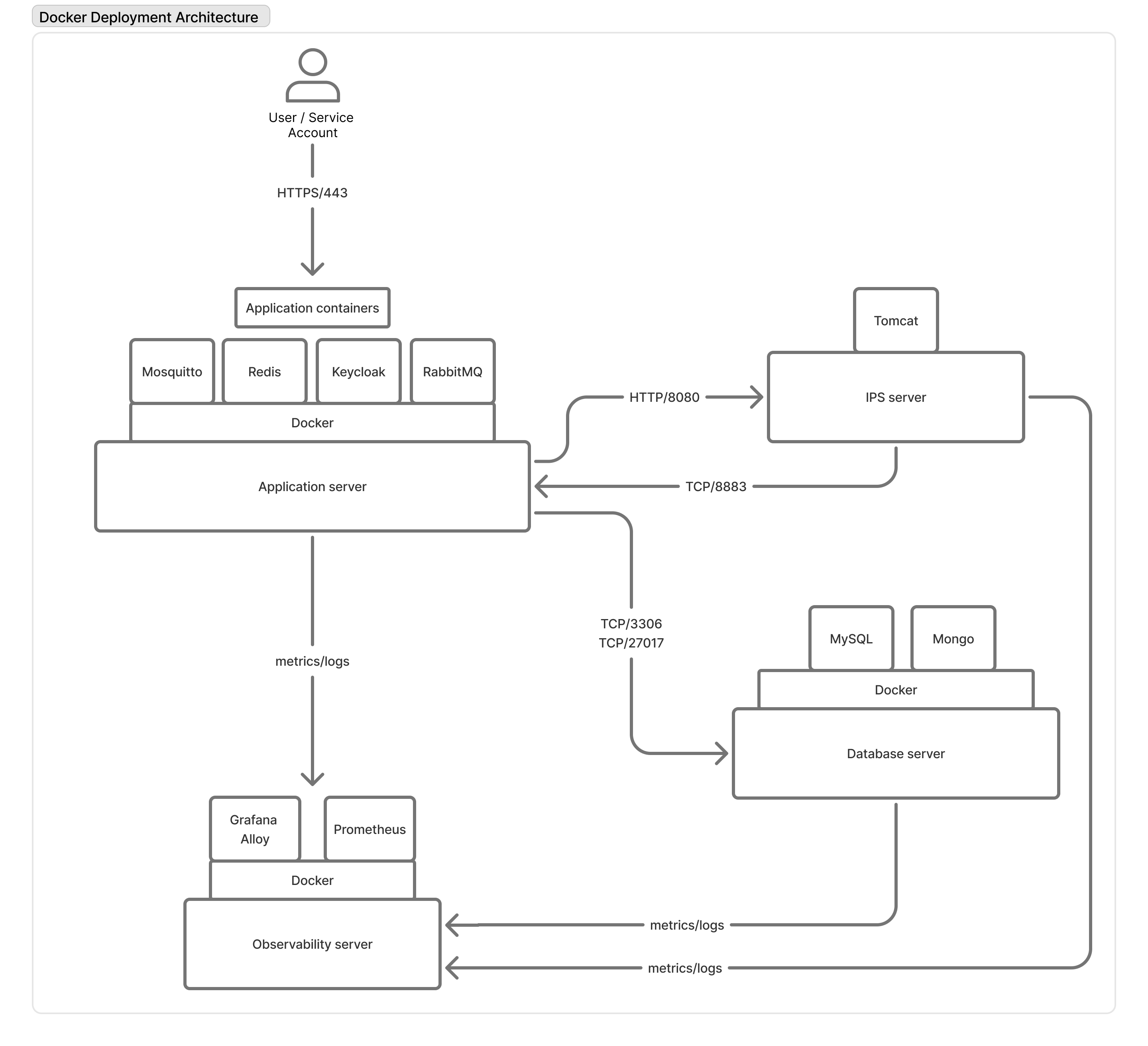
The IPS (Indoor Positioning System) service is the only component that does not run as a Docker container. It is deployed as a web application inside a system Tomcat service running directly on the IPS server operating system. The IPS server receives positioning data and exposes an HTTP API on port 8080 that is consumed by the backend microservices of the application server. Another option is for the IPS server to send data to the application via the MQTT server exposed on port TCP/8883.
2.3 Database services
The database layer runs on a dedicated database server and consists of the following Docker containers:
- MySQL: relational database used by several backend microservices to store structured application data. Exposed on TCP/3306.
- MongoDB: document-oriented database used by backend microservices that require flexible schema storage. Exposed on TCP/27017.
- Redis: in-memory data store used as a cache and session store. Exposed on TCP/6379.
2.4 Observability services
The observability layer runs on a dedicated observability server and consists of the following Docker containers:
- Grafana Alloy: a log collector that collects logs from each server and forwards them to the backend observability storage.
- Prometheus: a metrics collection and storage server. It scrapes metrics exposed by the application containers and the database containers and stores them for querying and alerting.
3. Infrastructure setup
3.1 Architecture overview
The on-premise deployment of the BlueGPS application is distributed across four servers, each dedicated to a specific layer of the architecture. All servers must reside on the same private network. The following figure illustrates the on-premise deployment architecture.
3.2 Server requirements
The table below lists the minimum hardware and storage requirements for each server in the on-premise deployment. The additional disk is used exclusively for application data (container volumes, database files, metrics storage) and, except for the IPS server, must be divided into two partitions mounted at the indicated mount points before any installation is performed.
| Server | vCPU | Memory | OS Disk | Additional Disk | Mount Points |
|---|---|---|---|---|---|
| Application server | 12 | 32 GB | 50 GB | p1: 50 GB, p2: 50GB | /var/lib/containerd, /var/lib/docker |
| Database server | 12 | 32 GB | 50 GB | p1: 50 GB, p2: 150GB | /var/lib/containerd, /var/lib/docker |
| IPS server | 12 | 32 GB | 50 GB | 50 GB | /opt/position-engine/ |
| Observability server | 8 | 16 GB | 50 GB | p1: 50 GB, p2: 50GB | /var/lib/containerd, /var/lib/docker |
All servers must run a supported 64-bit Linux operating system, with Ubuntu Server 24.04 LTS being the recommended distribution.
Except for the IPS server, the latest stable release of the Docker engine should be installed on all the hosts.
N.B. The server requirements listed above are minimums and may vary based on the specific workload.
3.3 Two-server deployment
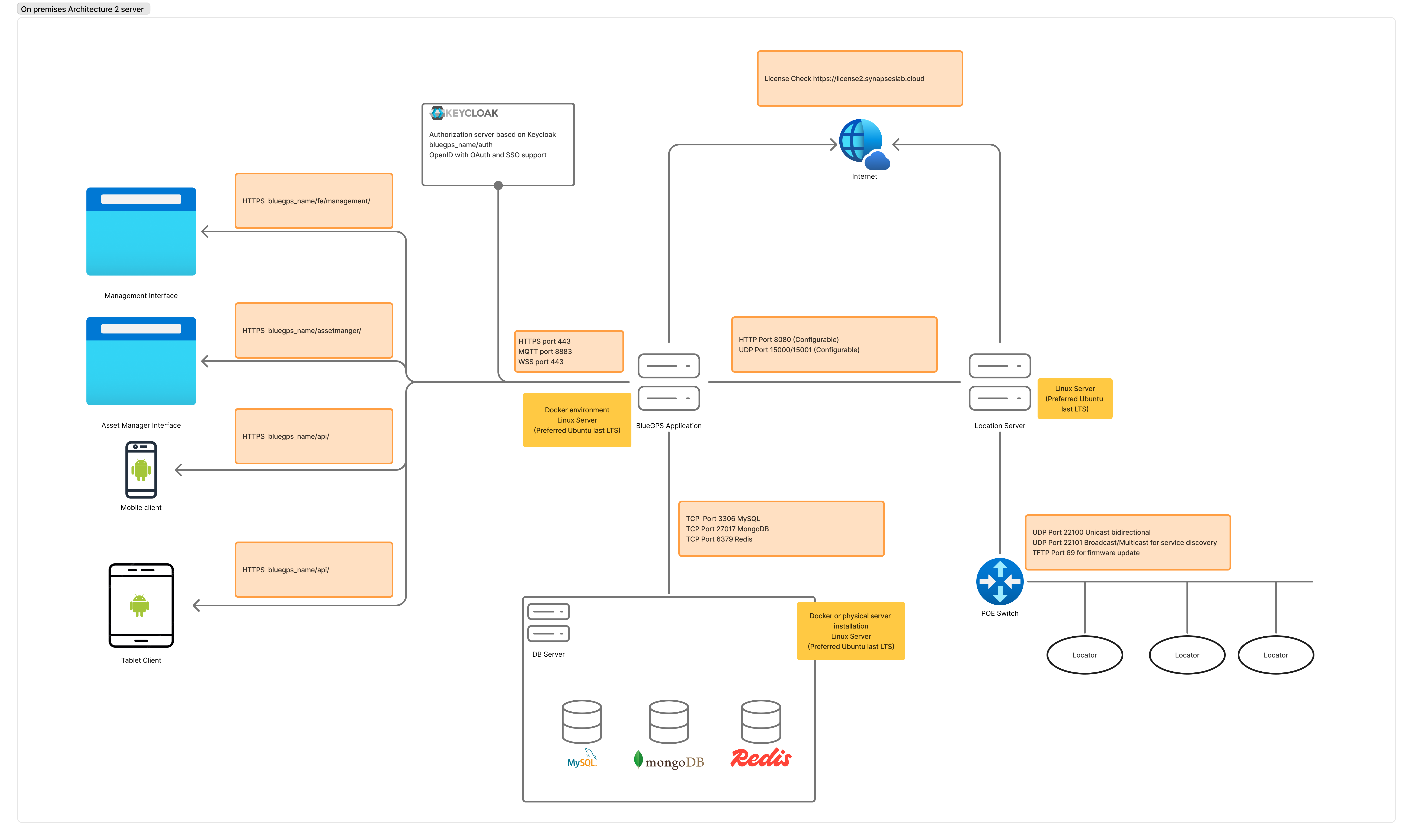
As a more compact alternative to the four-server reference layout described above, BlueGPS can also be deployed on two servers (physical or virtual). This variant collapses the application, database and observability layers onto a single host, keeping the IPS service isolated on its own machine — which remains a hard requirement because the Position Engine runs as a system Tomcat service alongside the LAN-attached locators.
The resulting topology is:
- Server 1 — BlueGPS Application server
- Hosts all application containers (web proxy, API gateway, frontend microservices, backend microservices, Keycloak, RabbitMQ, Mosquitto).
- Hosts the database containers (MySQL, MongoDB, Redis) co-located on the same host instead of on a dedicated DB server.
- Hosts the observability containers (Grafana Alloy, Prometheus) co-located on the same host instead of on a dedicated observability server.
- Linux server, recommended Ubuntu Server 24.04 LTS, Docker engine installed.
- Server 2 — IPS / Location server
- Runs the Position Engine inside a system Tomcat service (no Docker).
- LAN-attached to the PoE switch that powers and connects the locators.
- Linux server, recommended Ubuntu Server 24.04 LTS.
Both servers must reside on the same private network. The Application server reaches the Internet only for licence verification against https://license2.synapseslab.cloud; all other traffic stays on the LAN.
Network communications
The table below summarises every network channel that must be opened between the components. Ports marked configurable can be changed in the BlueGPS application configuration and on the IPS server.
| From | To | Protocol / Port | Purpose |
|---|---|---|---|
| Management Interface (browser) | Application server | HTTPS / 443 — path bluegps_name/fe/management/ | Web admin UI |
| Asset Manager Interface (browser) | Application server | HTTPS / 443 — path bluegps_name/assetmanager/ | Asset manager UI |
| Mobile client | Application server | HTTPS / 443 — path bluegps_name/api/ | Mobile API + auth at bluegps_name/auth (Keycloak, OpenID / OAuth / SSO) |
| Tablet client | Application server | HTTPS / 443 — path bluegps_name/api/ | Tablet API |
| Application server (Keycloak) | Management / Asset Manager / Mobile / Tablet clients | HTTPS / 443 — path bluegps_name/auth | OpenID / OAuth 2.0 / SSO |
| Application server | Application server (internal) | MQTT / 8883 · WSS / 443 | Real-time location push (asynchronous) |
| Application server | Application server (internal, loopback) | TCP / 3306 (MySQL) · TCP / 27017 (MongoDB) · TCP / 6379 (Redis) | Database access — local to the same host in this 2-server variant |
| Application server | IPS server | HTTP / 8080 (configurable) · UDP / 15000–15001 (configurable) | Positioning data ingest (HTTP API) and Position Engine data stream (UDP) |
| Application server | Internet (license2.synapseslab.cloud) | HTTPS / 443 | Licence check |
| IPS server | PoE switch (locators VLAN) | UDP / 22100 unicast bidirectional · UDP / 22101 broadcast / multicast · TFTP / 69 | Locator data, service discovery, firmware updates |
Firewall recommendations
- Expose only TCP / 443 of the Application server to client networks; keep MQTT / 8883 and WSS / 443 restricted to clients that actually need real-time push.
- Keep the IPS server and the locators on a dedicated VLAN; allow only the Application server to reach
HTTP / 8080andUDP / 15000–15001on the IPS server. - Outbound HTTPS to
license2.synapseslab.cloudmust be reachable from the Application server. - TFTP / 69 must be reachable from the IPS server to the locators network for firmware updates; it should never be exposed beyond the locators VLAN.
3.4 Push notification (optional)
Optional. Push notification is something the customer opts into, not a consequence of deploying the mobile application. It takes two decisions: the BlueGPS mobile application has to be installed on the devices, and the customer has to accept that notifications transit the Apple and Google push services. An installation that declines either needs none of the connections below, and the platform runs without them.
Notifications are delivered by those two services and not by the BlueGPS server, which is the point to weigh: the payload leaves the customer's infrastructure. The application server therefore needs outbound access to the endpoints below.
Apple Push Notification service, over TCP:
gateway.push.apple.comon 2195, andfeedback.push.apple.comon 2196, for production.gateway.sandbox.push.apple.comon 2195, andfeedback.sandbox.push.apple.comon 2196, for the sandbox.
Firebase Cloud Messaging, over TCP to https://fcm.googleapis.com/fcm/send. Google does not publish fixed addresses for FCM, because the range changes often enough that a firewall rule pinned to it goes stale. See the Firebase documentation for the current guidance.
Annex A. Advanced networking
This annex covers what the locators need from the network in order to reach the Position Engine, the DHCP configuration to fall back on when discovery by broadcast is not available, and the channel used for remote assistance. Ports are not repeated here: section 3.3 carries the authoritative table, including the locator side.
A.1 Locator network requirements
A locator holds no static configuration. It needs two things to come up:
- an IP address from a DHCP server;
- the address of the Position Engine, which it learns either by broadcasting on the local network or from DHCP option 43 (see A.2).
The Position Engine host takes its own address from DHCP as well. The IPS server must sit on the same network, or the same virtual network, as the locators it serves.
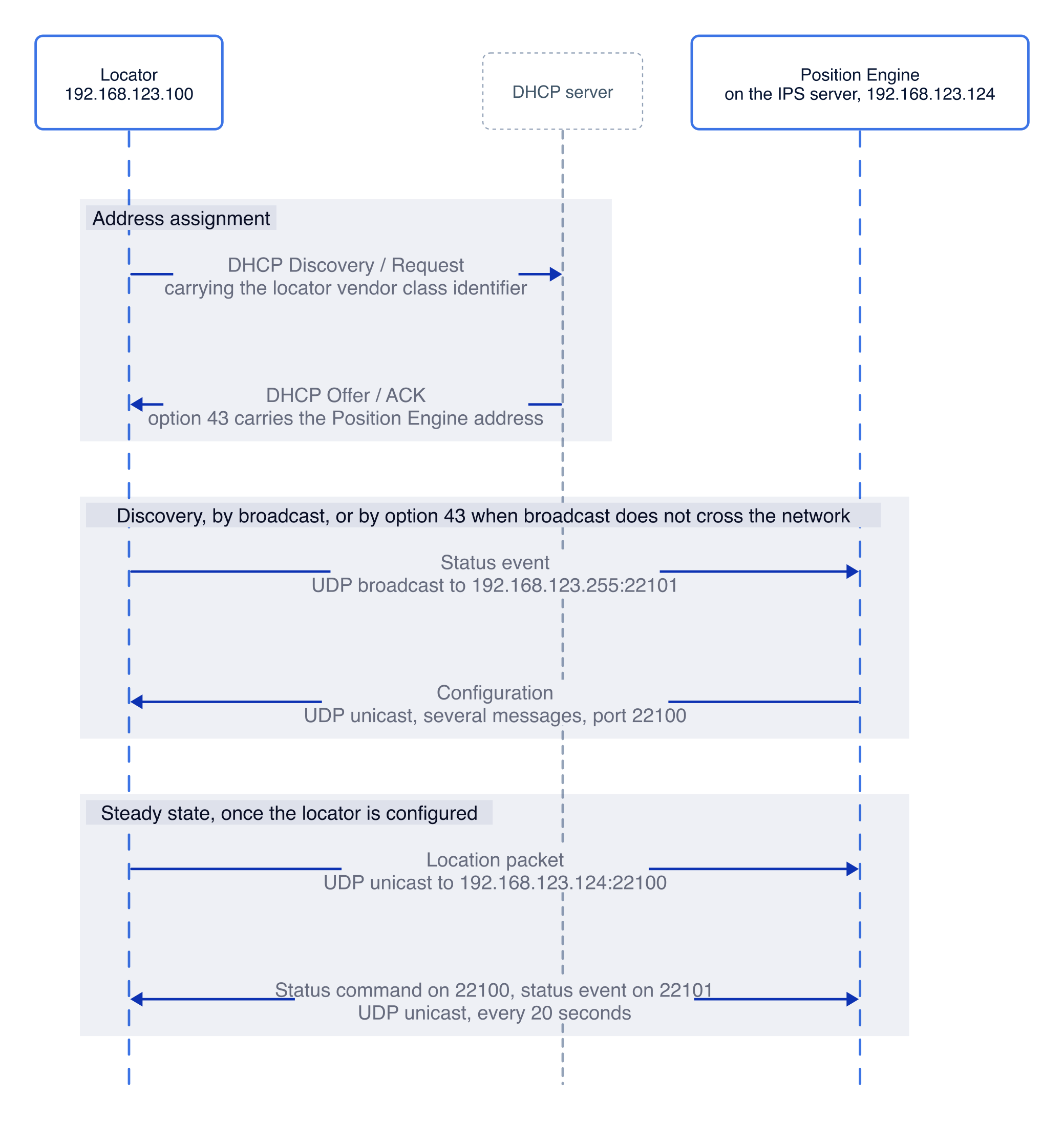
The exchange between a locator and the Position Engine is the following.
A.2 Advanced DHCP configuration
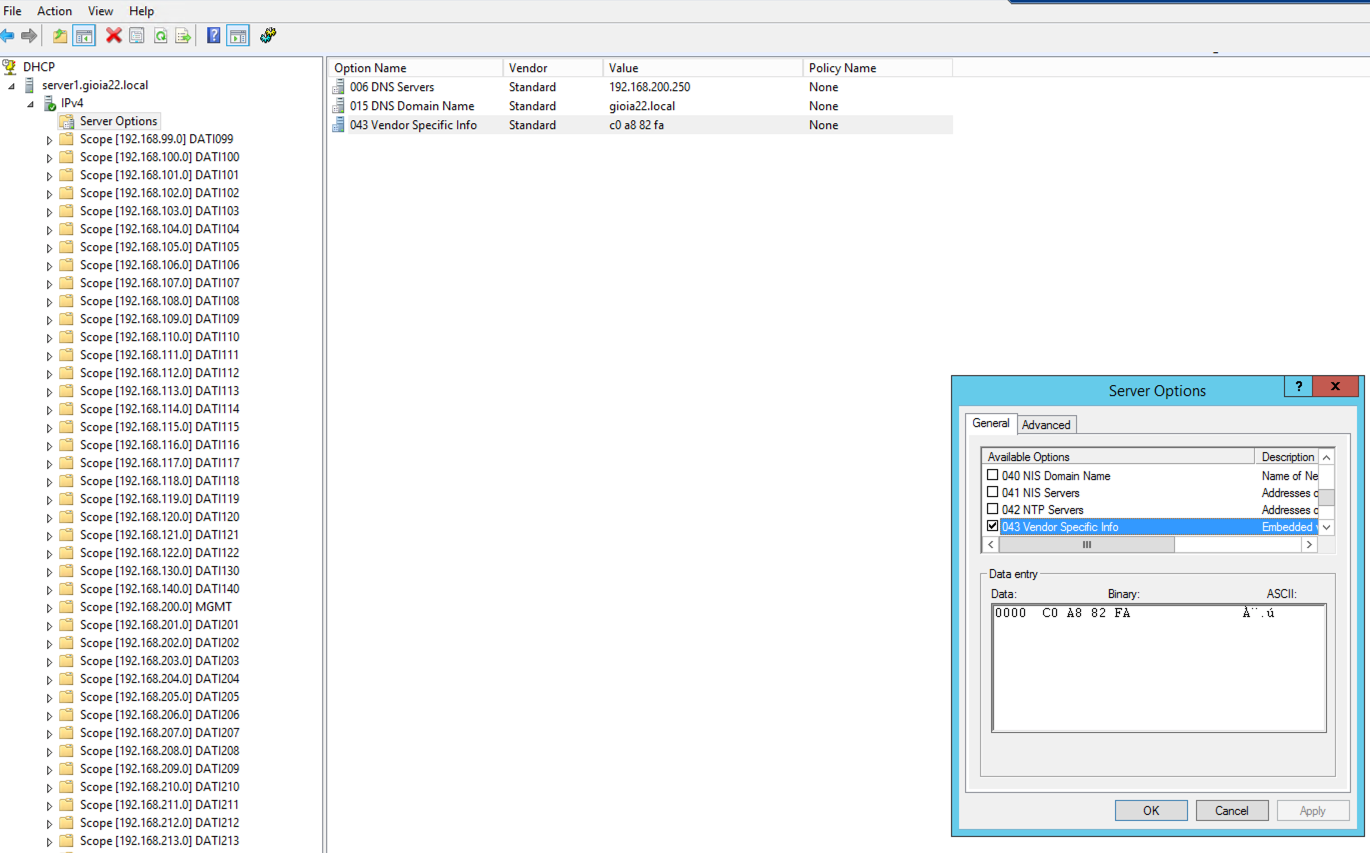
The discovery step above is a broadcast, so it does not survive a network that suppresses broadcast traffic, nor locators placed on a different subnet from the Position Engine. In either case the address of the engine has to be handed to the locator by the DHCP server instead:
- The locators send a vendor class identifier (VCI) in their DHCP Discovery and Request messages. The value is fixed in the locator firmware and depends on the model installed, so Synapses provides the exact string to match for the installation.
- The network administrator configures the DHCP server to answer those requests with a vendor specific information (VSI) option carrying the IP address of the machine running the Position Engine, in the DHCP Offer and ACK.
Things to watch for:
- The option names and the way a class is matched depend on the DHCP server software. Refer to the vendor's own instructions.
<locator VCI>in the examples below stands for the identifier described above. It has to be matched verbatim, so substitute the value provided for the installation.- The server IP address must be given to the option in hexadecimal form.
ISC DHCP on Linux, for a network 192.168.123.0/24 with the Position Engine on 192.168.123.124:
##########################################################
option serverip code 43 = ip-address;
class "vendor-class" {
    match option vendor-class-identifier;
}
##########################################################
# This is a very basic subnet declaration.
subnet 192.168.123.0 netmask 255.255.255.0 {
    subclass "vendor-class" "<locator VCI>" {
        option vendor-class-identifier "<locator VCI>";
        # option serverip <ip address of the IPS server>
        option serverip 192.168.123.124;
    }
    range 192.168.123.150 192.168.123.250;
}
##########################################################
Windows DHCP Server, for a network 192.168.130.0/24 with the Position Engine on 192.168.130.250. Option 43 takes the address as hexadecimal in the binary column: the hex form of 192.168.130.250 is C0A882FA.
A.3 Remote support access
Where remote assistance is agreed, the IPS server reaches the BlueGPS cloud over OpenVPN, on TCP 943 or UDP 1194. The tunnel is opened from inside the customer network, so no inbound port has to be published.