1. BlueGPS And Keycloak Authentication
BlueGPS uses Keycloak as the central authentication system.
Keycloak is responsible for authenticating users, integrating with external identity sources, issuing tokens, and managing sessions. The BlueGPS frontend, mobile app, and backend do not authenticate users directly. They integrate with Keycloak and trust the tokens issued by Keycloak.
The BlueGPS frontend and mobile app use the standard OAuth 2.0 / OpenID Connect authorization code flow.
In this flow:
- The user starts from the BlueGPS frontend or mobile app.
- The application redirects the user to Keycloak.
- Keycloak authenticates the user.
- Keycloak returns an authorization code to the application.
- The application exchanges the authorization code for tokens.
- The application calls the backend using the access token.
- The backend validates the token before serving the request.
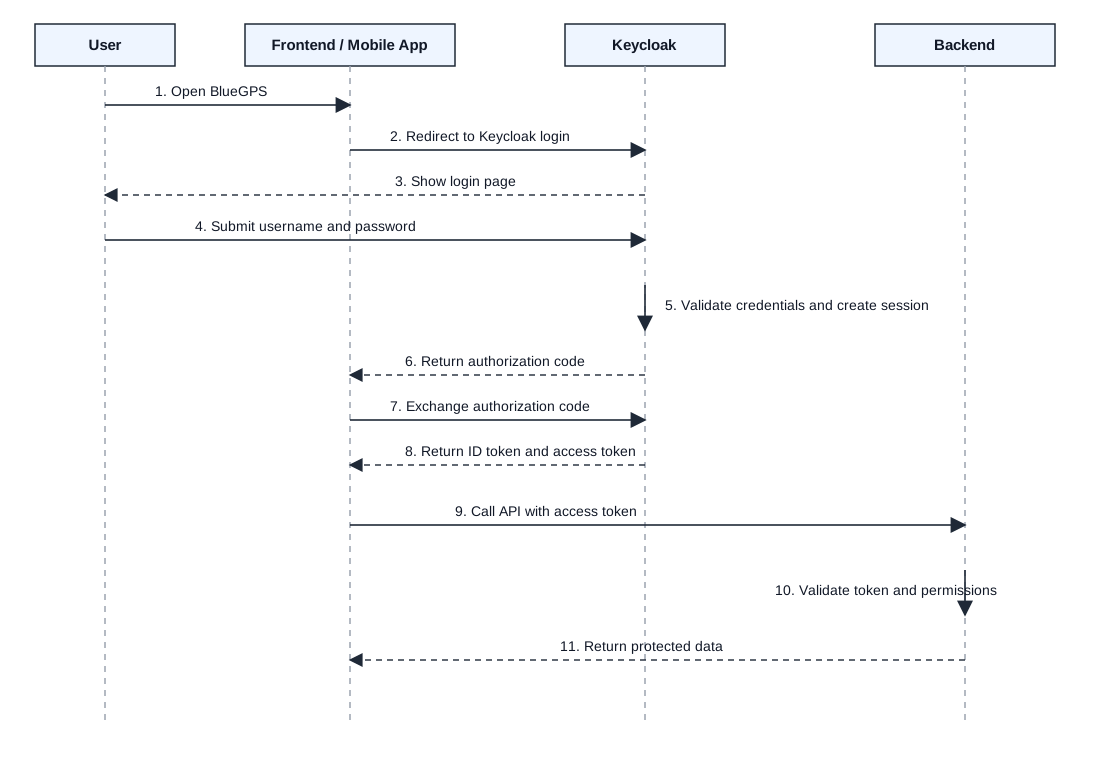
Step-by-step flow
- The user opens the BlueGPS frontend or mobile app.
- The application redirects the user to Keycloak.
- Keycloak shows the login page.
- The user enters their username and password.
- Keycloak validates the credentials and creates a user session.
- Keycloak returns an authorization code to the frontend or mobile app.
- The frontend or mobile app exchanges the authorization code with Keycloak.
- Keycloak returns an ID token and access token.
- The frontend or mobile app calls the backend API with the access token.
- The backend validates the token and permissions.
- The backend returns the protected data.
Integration responsibilities
| Component | Responsibility |
|---|---|
| Frontend | Redirects users to Keycloak, receives tokens, calls backend APIs with access tokens. |
| Mobile app | Opens the Keycloak login flow, receives tokens, stores them securely, calls backend APIs. |
| Backend | Validates Keycloak access tokens and enforces authorization rules. |
| Keycloak | Authenticates users, manages sessions, issues tokens, and provides token validation metadata. |
2. External Identity Provider Integration
Keycloak can integrate with an external identity provider such as Microsoft Entra ID.
In this model, Keycloak acts as an identity broker:
- BlueGPS still redirects users to Keycloak.
- Keycloak redirects the user to Microsoft Entra ID.
- Microsoft Entra ID authenticates the user.
- Keycloak receives the authentication result from Microsoft Entra ID.
- Keycloak maps the external identity to a BlueGPS user.
- Keycloak issues the tokens used by BlueGPS.
The important point is that BlueGPS continues to trust Keycloak-issued tokens. The backend does not need to validate Microsoft Entra ID tokens directly.
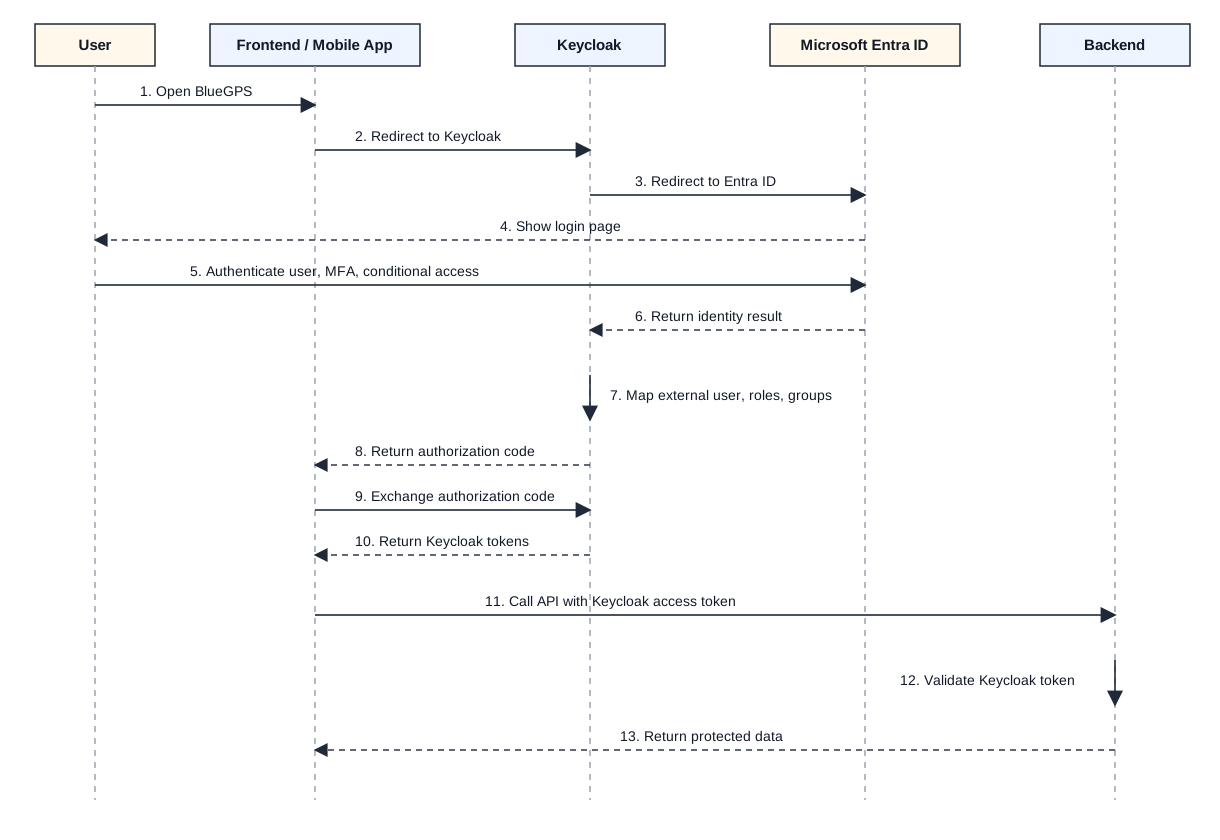
Step-by-step flow
- The user opens the BlueGPS frontend or mobile app.
- The application redirects the user to Keycloak.
- Keycloak redirects the user to Microsoft Entra ID.
- Microsoft Entra ID shows the login page.
- Microsoft Entra ID authenticates the user and applies enterprise security controls such as MFA or conditional access.
- Microsoft Entra ID returns the authentication result back to Keycloak.
- Keycloak maps the external user to a local Keycloak user identity and applies BlueGPS role and group mappings.
- Keycloak returns an authorization code to the frontend or mobile app.
- The frontend or mobile app exchanges the authorization code with Keycloak.
- Keycloak returns Keycloak tokens (ID token and access token).
- The frontend or mobile app calls the backend API with the Keycloak access token.
- The backend validates the Keycloak token.
- The backend returns the protected data.
Integration responsibilities
| Component | Responsibility |
|---|---|
| Microsoft Entra ID | Authenticates enterprise users and applies enterprise access policies. |
| Keycloak | Brokers the login, maps external users, and issues BlueGPS tokens. |
| Frontend / mobile app | Starts the login flow and uses Keycloak tokens. |
| Backend | Validates only Keycloak-issued access tokens. |
Attribute and Group Mapping
Keycloak can use mappers to map claims from the external identity provider's token (such as group membership information) to Keycloak groups. This allows users to automatically be assigned to the appropriate groups based on their enterprise directory attributes.
The requirement is that appropriate claims should be present on the external identity provider's token for the group mapping to work.
Configuring the groups claim in Microsoft Entra ID
When using Microsoft Entra ID as the external identity provider, the groups claim must be explicitly added to the tokens issued to Keycloak. To do this:
- Open the Azure Portal and navigate to Microsoft Entra ID.
- Go to Enterprise applications and select the application registered for Keycloak.
- Under Manage, click Single sign-on.
- In the Attributes & Claims section, click Edit.
- Click Add new claim.
- Set the claim Name to
groups. - Set the Source attribute to
user.groups. - Save the claim.
Once this claim is present in the token, the groups claim will contain the object IDs of the groups the user belongs to in Microsoft Entra ID. These are GUIDs, not display names (for example, xxxxxxxx-xxxx-xxxx-xxxx-xxxxxxxxxxxx).
On the Keycloak side, a mapper can be created on the identity provider configuration to read the groups claim and match each group object ID to a Keycloak group. This allows a specific Entra ID group ID to be mapped to a specific Keycloak group, so that users are automatically assigned the correct roles and permissions when they log in through Microsoft Entra ID.
3. LDAP Integration
Keycloak can integrate with LDAP as a user federation source.
In this model:
- Users still log in through Keycloak.
- Keycloak connects to LDAP to find users and validate credentials.
- LDAP remains behind Keycloak.
- BlueGPS does not connect directly to LDAP.
- After successful authentication, Keycloak issues the tokens used by BlueGPS.
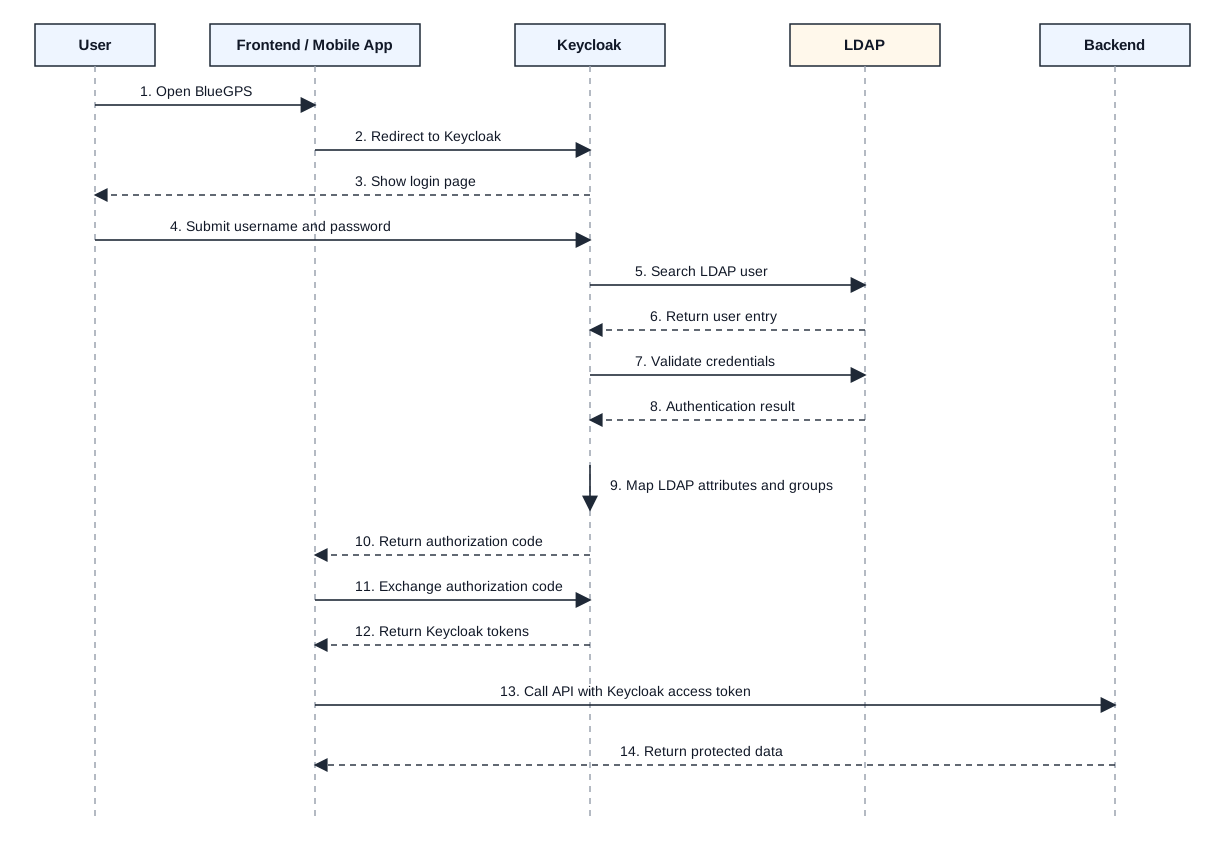
Step-by-step flow
- The user opens the BlueGPS frontend or mobile app.
- The application redirects the user to Keycloak.
- Keycloak shows the login page.
- The user enters their username and password.
- Keycloak searches LDAP for the user.
- LDAP returns the matching user entry.
- Keycloak validates the credentials against LDAP.
- LDAP returns the authentication result.
- Keycloak maps LDAP attributes and groups to the Keycloak user model.
- Keycloak returns an authorization code to the frontend or mobile app.
- The frontend or mobile app exchanges the authorization code with Keycloak.
- Keycloak returns Keycloak tokens (ID token and access token).
- The frontend or mobile app calls the backend API with the Keycloak access token.
- The backend returns the protected data.
Integration responsibilities
| Component | Responsibility |
|---|---|
| LDAP | Stores users, credentials, and optionally groups. |
| Keycloak | Federates LDAP users, validates credentials, maps attributes and groups, and issues tokens. |
| Frontend / mobile app | Uses Keycloak as the login entry point. |
| Backend | Validates Keycloak-issued access tokens. |
Summary
Keycloak is the central authentication layer for BlueGPS.
- The frontend and mobile app authenticate users through Keycloak.
- The backend validates Keycloak access tokens.
- Microsoft Entra ID can be integrated through Keycloak as an external identity provider.
- LDAP can be integrated through Keycloak as a user federation source.
- BlueGPS services trust Keycloak as the token issuer.